
Software overview
The factory PineVoice firmware is open-source and turns PineVoice into a voice assistant satellite. It provides Wi-Fi provisioning over Improv and voice assistant connectivity over the Wyoming protocol.
Firmware is using Alibaba’s AliOS, specifically it’s “YoC/YoCop” variation.
Supported features
The current factory firmware supports:
- Wi-Fi provisioning using the Improv protocol over Bluetooth Low Energy
- Wyoming satellite for compatible assistance applications
- Wyoming mDNS auto-discovery for compatible assistance applications
- Local wake word detection using MicroWakeWord
Setup
On first boot, PineVoice starts in Wi-Fi provisioning mode. In this mode, the ring LED blinks yellow. Use WiFi Setup to connect PineVoice to a Wi-Fi network and follow further instructions for connection with Assistance application which supports Wyoming protocol, such as Home Assistant.
LED ring lightshows
The center LED ring is used to show the current state of PineVoice. For most actions and states, light shows are used instead of voice feedback so PineVoice does not unexpectedly disturb the user, for example during the night. Active-state light shows, such as the dim cyan standby light, are intentionally kept dim so they remain visible without being distracting in a dark room.
Startup and setup
| Light show | Meaning |
|---|---|
| Dim white fade-in/fade-out, once | Boot-up lightshow. PineVoice has started. |
| Yellow breath, loop | PineVoice is in provisioning mode and is ready to connect to Wi-Fi through the Improv protocol. |
| Green fade-in/fade-out, once | Identification signal during provisioning, used to identify the paired PineVoice. |
| Dim orange breath, loop | PineVoice is trying to connect to Wi-Fi. |
| Dim magenta breath, loop | PineVoice is waiting for a Wyoming client to connect. |
Assistant states
| Light show | Meaning |
|---|---|
| Dim cyan, still | PineVoice is active and in standby, waiting for the user to press the center button or say the wake word. |
| Blue-cyan-blue breath, loop | PineVoice is listening to the user’s voice input. |
| Dim purple, still | PineVoice is processing the user’s input. |
| Slow green breath, loop | PineVoice is answering. |
Action feedback
| Light show | Meaning |
|---|---|
| White fade-in, once | Volume up. |
| White fade-out, once | Volume down. |
| Red fade-out, once | An error happened or the action failed. |
Button controls
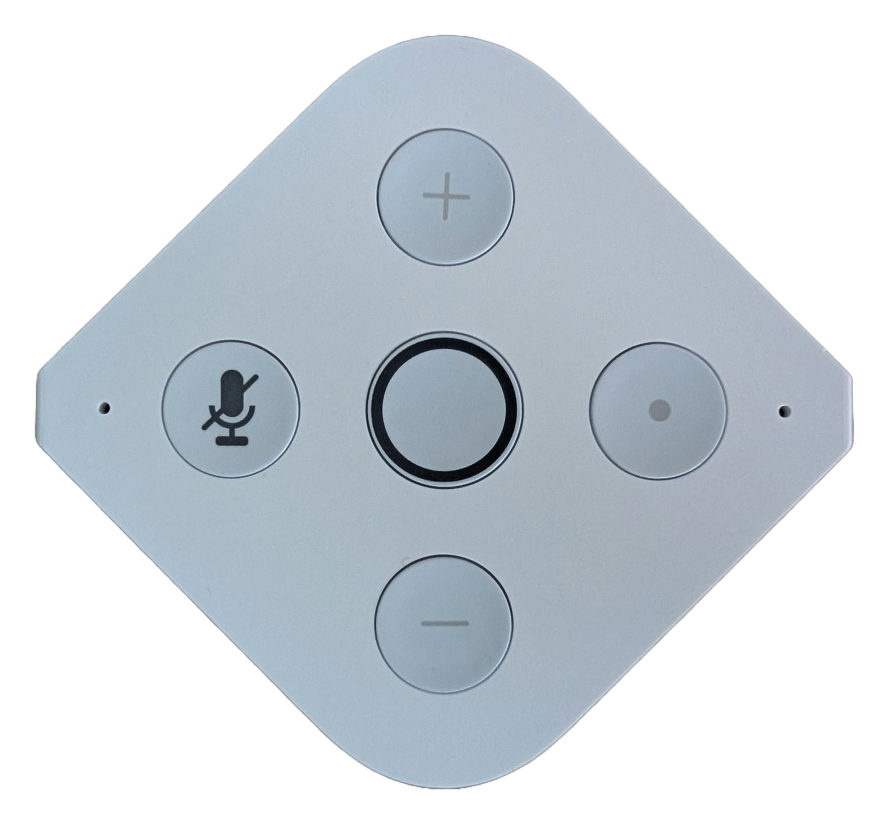
PineVoice buttons view
PineVoice has five top buttons for voice control, volume, microphone mute, and provisioning.
- Center LED ring button - starts a voice command session.
+button - increases the volume.-button - decreases the volume.- Microphone button - hardware microphone mute. The button shines red while microphone mute is active.
- Dot / user button - currently used to enter provisioning mode. Hold it for 15 seconds to reset Wi-Fi setup and return PineVoice to provisioning mode.
Voice feedback
As mentioned in LED ring lightshows, voice feedback is used rarely. PineVoice mostly uses light shows instead, and voice feedback is generally reserved for direct user interaction.
Audio feedback is currently used in the following cases:
- Wi-Fi provisioning started - played when Wi-Fi provisioning starts, including on first boot.
- Wi-Fi provisioning succeeded or failed - played when Wi-Fi provisioning finishes successfully or fails.
- Wyoming satellite is disconnected - played when Assist is attempted, but the Wyoming satellite/client is not connected.
- Wi-Fi is disconnected - played when Assist is attempted, but PineVoice is not connected to Wi-Fi.
Wake word detection
PineVoice uses MicroWakeWord for local wake word detection.
For now, PineVoice uses the “Hey Jarvis” model from the ESPHome MicroWakeWord models project. The wake word generally works well, but recognition may vary depending on the speaker’s voice, pronunciation, distance from the device, and background noise.
Source code
You can find source code of this firmware (PineVoice SmartSpeaker SDK) on Codeberg and Github.